WordPress Image Optimization in 2026: Free vs Paid Options
A practical breakdown of every major WordPress image optimization plugin in 2026: what they cost, what they actually do, and which one fits your situation.
There are dozens of WordPress image optimization plugins. Most of them charge monthly fees, per-image credits, or annual subscriptions. A few are free but limited. Sorting through them is tedious because they all claim to make your images faster, but they do very different things under the hood: some just compress, some offload to cloud storage, some serve through their own CDN, and most don’t touch your media library’s structural problems. Here’s the landscape for WordPress image optimization free and paid options in 2026, with an honest look at what each tool actually gives you.
Prices in this post were verified June 2026 against each vendor’s published pricing page. Plans and tiers do change. Confirm on the vendor’s site before purchasing.
The Paid Options
ShortPixel: from $8.33/month
ShortPixel moved away from per-credit subscriptions in 2025–2026. The main paid plans are now unlimited-usage monthly subscriptions, with one-time credit packs available alongside for users who only need a finite bulk-optimization pass.
- Processing: Cloud-based, on ShortPixel’s servers
- What it does: Compression (lossy/glossy/lossless via “SmartCompress”), WebP and AVIF conversion, SmartCrop for thumbnails, CDN delivery (500 GB/month included)
- Storage: Files stay on your server
- Pricing:
- Unlimited: $8.33/month billed annually, or $9.99/month billed monthly, unlimited credits, unlimited websites, 500 GB CDN traffic
- Unlimited AI: $13.33/month annually, or $15.99/month monthly, adds unlimited AI background removal and AI image upscaling
- One-time credit packs: $19.99 for 30,000 credits, $29.99 for 50,000, $49.99 for 100,000, $99.00 for 250,000. Credits never expire, no recurring fee
- Catch: The entry tier is now an unlimited subscription rather than a small credit plan, so the cheapest way in is higher than it used to be. Sites that previously fit the $3.99-with-a-few-thousand-credits tier now either pay $8.33+/month or buy a one-time bundle. WordPress sites that mostly just need a bulk pass once a year may find the one-time packs more economical than a subscription.
ShortPixel does compression and CDN delivery well, and the AI features are a real differentiator. It still doesn’t handle cloud offloading to your own bucket or media library scanning.
Imagify: from $4.99/month
Imagify is made by the WP Rocket team. It’s a cloud-based compression service with a WordPress plugin that automates the process, bandwidth-tiered subscriptions rather than ShortPixel’s unlimited model.
- Processing: Cloud-based, on Imagify’s servers
- What it does: Compression (normal, aggressive, ultra), WebP and AVIF conversion
- Storage: Files stay on your server
- Pricing: Free tier: 20 MB/month (≈200 images). Growth: $5.99/month or $4.99/month billed annually (500 MB/month, ≈5,000 images). Infinite: $11.99/month or $9.99/month billed annually (unlimited).
- Catch: The free tier is extremely small. A handful of high-resolution photos can exceed 20 MB. The Growth plan’s 500 MB/month gets consumed fast on a busy site.
If you already use WP Rocket, Imagify integrates smoothly. But like ShortPixel, it only handles compression. No offloading, no CDN, no scanning.
Optimole: visit-based pricing
Optimole takes a different approach. Instead of compressing files on your server, it rewrites your image URLs to point to their CDN. When a visitor requests an image, Optimole processes it in real time: resizing for the visitor’s viewport, converting to WebP or AVIF, and serving from their network.
- Processing: Cloud-based, real-time on first request
- What it does: On-the-fly resize, compression, WebP/AVIF, lazy loading
- Storage: Originals on your server, processed variants on Optimole’s CDN
- CDN: Built-in, powered by CloudFront
- Pricing: Tiered by monthly visits. Starter covers up to 48,000 visits/month; Business covers up to 120,000; Flexible covers up to 300,000. Annual billing saves ~20%. Check
optimole.com/pricingfor current dollar amounts at each tier. - Catch: Your image delivery depends entirely on Optimole’s servers. If you stop paying or they go down, images revert to unoptimized originals.
Optimole is the most hands-off option. It’s also the most expensive at scale, and the one with the strongest vendor lock-in.
WP Offload Media: from $39/year (tiered by media-item count)
WP Offload Media by Delicious Brains handles one thing: moving your media files from your server to cloud storage (Amazon S3, Google Cloud Storage, or DigitalOcean Spaces). It rewrites URLs so files are served from the cloud provider.
- Processing: None. It doesn’t optimize or compress images.
- What it does: Offloads files to S3/GCS/Spaces, rewrites URLs
- Storage: Your cloud provider account
- CDN: Whatever you configure (CloudFront, etc.)
- Pricing: Now tiered by media-item count, with unlimited sites at every tier. Bronze $39/year (≤2,000 items), Silver $59/year (≤6,000), Gold $149/year (≤20,000), Platinum $199/year (≤40,000), Adamantium $349/year (≤100,000), 500K at $799/year, Unlimited at $1,199/year. New customers typically see a first-year discount.
- Catch: It’s offloading only. You still need a separate plugin for compression, WebP conversion, and resizing. Cloud storage and CDN costs are on top of the license. The item-count tiers mean a large media library forces you into an expensive plan even on a single site.
WP Offload Media is solid if all you want is to move files off your server. The unlimited-sites licensing makes it more attractive for agencies than it used to be, but you’re still paying for an S3 upload bridge with no optimization in the box.
| Plugin | Free tier | Paid pricing | Pricing model | What you pay for |
|---|---|---|---|---|
| ShortPixel | Free signup with monthly free credits | Unlimited $8.33/mo annual ($9.99/mo monthly); Unlimited AI $13.33/mo annual; one-time bundles from $19.99 (30K credits) | Subscription (unlimited) or one-time credit pack | Cloud compression + WebP/AVIF + CDN + (Unlimited AI tier) AI tools |
| Imagify | 20 MB/month (~200 images) | $4.99/mo Growth (500 MB), $9.99/mo Infinite (unlimited), billed annually | Bandwidth-based | Cloud compression + WebP/AVIF |
| Optimole | Up to ~5,000 visits/month | Starter (48k visits), Business (120k), Flexible (300k), annual saves ~20% | Visit-based | Real-time CDN, on-the-fly resize, WebP/AVIF |
| WP Offload Media | None | $39/yr (≤2k items) up to $1,199/yr (unlimited), unlimited sites at every tier | Annual license, item-count tiered | S3/GCS/Spaces upload bridge, no optimization |
Storage and CDN costs (R2, S3, CloudFront, etc.) are on top of plugin license fees for every option except Optimole, where the CDN is bundled into the plugin’s subscription.
The Free Options
EWWW Image Optimizer: Free Tier
EWWW has been around for years. The free tier uses your server’s own libraries (similar to how WordPress natively handles images) to compress files locally. No images are sent to external servers.
- Processing: Local, on your server
- What it does: Lossless compression, WebP conversion (with some caveats), lazy loading
- Pricing: Free for local optimization. Paid API plans now start at $80/year (Standard), $160/year (Growth), $320/year (Infinite). Monthly billing also available at $8/$16/$32. Paid tiers add lossy compression, the Easy IO CDN, AVIF support, and performance tools.
- Limitations: The free tier is lossless only. Compression savings are modest compared to lossy. WebP conversion in the free tier requires server configuration that not all hosts support. No cloud offloading on the free plugin.
EWWW’s free tier is a decent starting point if all you need is basic compression and you don’t mind modest file size reductions.
Smush: Free Tier
Smush by WPMU DEV is one of the most installed image optimization plugins. The free tier compresses images up to 5 MB each on their servers.
- Processing: Cloud-based, on WPMU DEV’s servers
- What it does: Lossy compression, bulk optimization
- Pricing: Free with a 5 MB per-image limit. Pro Basic $3/month (1 site, 50 GB CDN), Pro Standard $5/month (3 sites, 100 GB CDN), Pro Plus $10/month (10 sites, 250 GB CDN). Premium covers unlimited sites and bundles additional WPMU DEV tools.
- Limitations: The free tier has no WebP conversion, no cloud offloading, no CDN. The 5 MB limit means high-resolution photos from modern cameras won’t be processed. Bulk optimization is capped at 50 images per batch in the free tier.
Smush free is fine for small blogs with modest image sizes. Pro tiers add Ultra 5× compression, WebP and AVIF, and a CDN, at per-site pricing that’s competitive with single-feature alternatives.
StaticQ Media: Free, No Limits
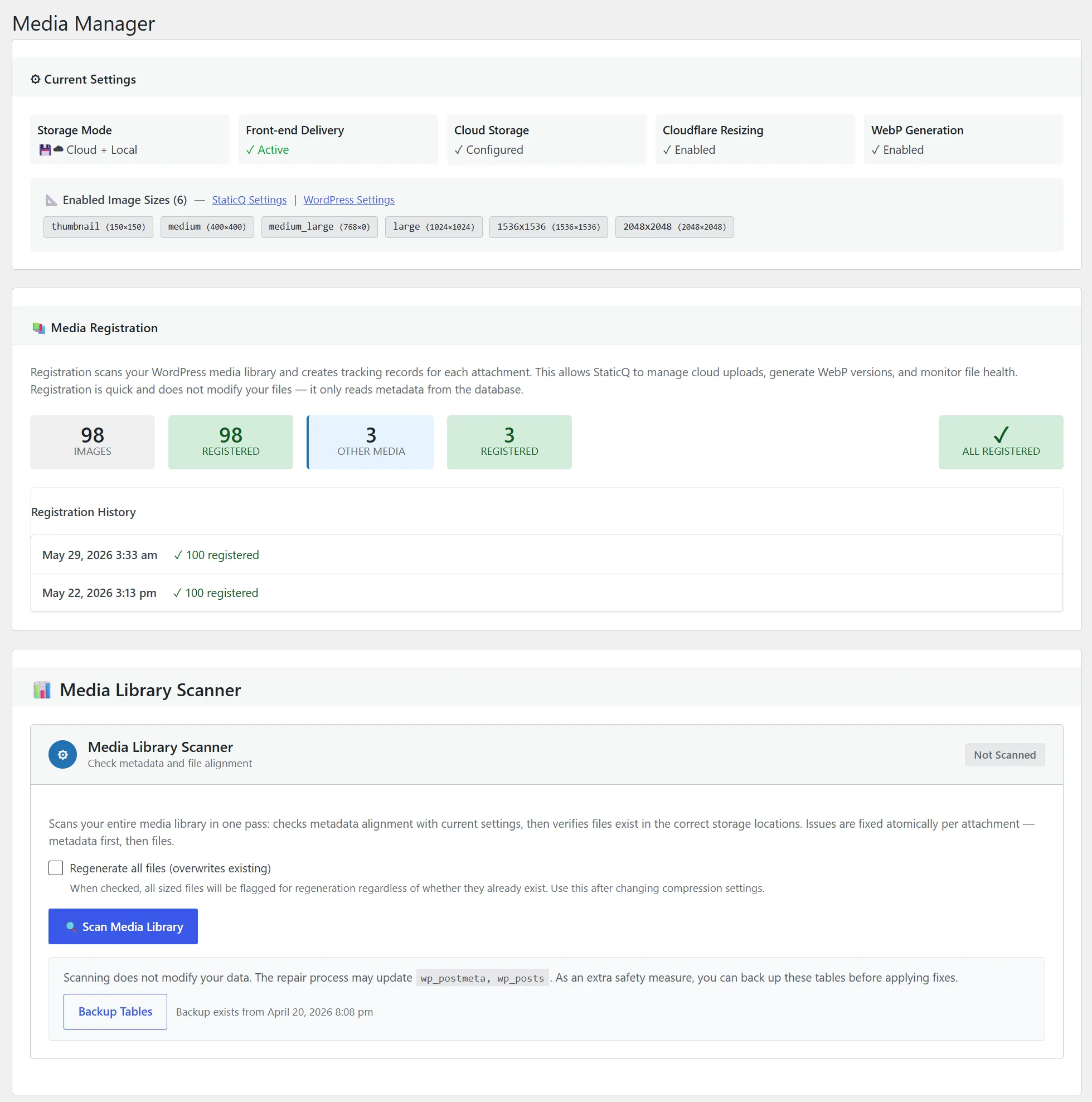
StaticQ Media is a complete media pipeline: resize, convert to WebP, offload to Cloudflare R2, serve through Cloudflare’s CDN, and scan your media library for problems. Everything is free. There’s no Pro tier, no credit system, no per-image fees, and no feature gating.
- Processing: Local (GD/Imagick) or Cloudflare Image Resizing API
- What it does: Resize to all registered sizes, WebP conversion, R2 offloading,
<picture>tag delivery with WebP fallback, lazy loading, three media library scanners - Storage: Your own Cloudflare R2 bucket (free tier: 10 GB, 10 million reads/month, zero egress)
- CDN: Cloudflare’s global CDN, through your own account
- Pricing: Free. All features included.
- Requirements: A Cloudflare account with your domain proxied. R2 bucket for cloud offloading.
StaticQ is the only free option that handles the full pipeline, processing, offloading, CDN delivery, and media library scanning, in a single plugin.
What to Consider When Choosing
Most comparison articles focus on compression ratios and speed benchmarks. Those matter, but they’re not the whole picture. Here’s what actually differentiates these tools:
Processing location. Does the plugin compress on your server (free but uses your CPU) or on a third party’s servers (fast but costs money and creates dependency)? StaticQ gives you both options: local processing (free) or Cloudflare’s edge via Image Resizing (requires a paid Cloudflare plan).
Storage. After optimization, where do the files live? On your server, on the plugin vendor’s CDN, or in a cloud bucket you own? Only StaticQ and WP Offload Media put files in storage you control. The difference is StaticQ does it for free.
CDN delivery. Some plugins include CDN delivery, some don’t. Optimole and StaticQ both include CDN. The difference: Optimole’s CDN is theirs; StaticQ’s is Cloudflare’s, on your account.
Scanning and cleanup. This is the category most plugins ignore entirely. Your media library accumulates problems over time: orphaned thumbnails from old themes, missing sizes from plugin changes, stale URLs from domain migrations. Only StaticQ includes scanners to find and fix these issues.
Pricing model. Credit-based (ShortPixel, Imagify) means costs scale with your library size. Visit-based (Optimole) means costs scale with your traffic. Annual license (WP Offload Media) is predictable but recurring. Free (StaticQ, EWWW free, Smush free) means no cost, but the free tiers of EWWW and Smush are significantly limited compared to their paid versions.
Vendor lock-in. If you stop using Optimole, your images revert to unoptimized originals and you lose CDN delivery. If you stop using ShortPixel or Imagify, your already-compressed files stay compressed but new uploads won’t be processed. If you stop using StaticQ, your R2 bucket still has all your optimized files. They’re yours.
| Plugin | Compression | WebP / AVIF | Cloud offload | CDN | Library scanner | Files you own | Price |
|---|---|---|---|---|---|---|---|
| ShortPixel | ✓ (cloud) | ✓ / ✓ | ✗ | ✓ (500 GB/mo included) | ✗ | ✓ | from $8.33/mo (annual) |
| Imagify | ✓ (cloud) | ✓ / ✓ | ✗ | ✗ | ✗ | ✓ | from $4.99/mo (annual) |
| Optimole | ✓ (cloud, real-time) | ✓ / ✓ | ✗ | ✓ (theirs) | ✗ | ✗ (CDN only) | Visit-based, tiered |
| WP Offload Media | ✗ | ✗ | ✓ | Yours to configure | ✗ | ✓ | $39–$1,199/yr (by item count) |
| EWWW (free) | ✓ (local, lossless only) | Conditional | ✗ | ✗ | ✗ | ✓ | Free (paid API from $80/yr) |
| Smush (free) | ✓ (cloud, ≤5 MB only) | ✗ | ✗ | ✗ | ✗ | ✓ | Free (Pro from $3/mo per site) |
| StaticQ Media | ✓ (local or Cloudflare) | ✓ / - | ✓ (your R2) | ✓ (your Cloudflare) | ✓ | ✓ | Free |
“Files you own” means the optimized images live in storage you control (your server or your cloud bucket), so dropping the plugin doesn’t take your library with it. Optimole’s processed variants live on their CDN. Stop paying and they’re gone.
AVIF support marked ”-” for StaticQ Media because it’s on the roadmap but not shipped yet; WebP is fully supported today.
Why StaticQ Is Different
Most image optimization plugins do one thing: compress images. A few add cloud offloading or CDN delivery. None of them address the structural health of your media library.
StaticQ Media is a complete pipeline in a single plugin:
- Process: resize to all registered sizes, generate WebP variants
- Offload: upload to your own R2 bucket, free your server’s disk
- Deliver: serve through Cloudflare’s CDN with automatic WebP fallback
- Scan: detect missing thumbnails, stale URLs in post content, orphaned files
- Clean up: fix what the scanner finds, remove what’s no longer needed
And it’s free. Not freemium, not free-with-limits, not free-tier-of-a-paid-product. Free.
Who Should Use What
“I just want compression.” ShortPixel or EWWW Image Optimizer. ShortPixel for aggressive lossy compression via their cloud. EWWW for local lossless optimization without sending images to a third party. Both are good at what they do, though ShortPixel costs money and EWWW’s free tier is modest.
“I want cloud offloading.” StaticQ Media (free) or WP Offload Media (from $39/year on the smallest tier). Both move your files to cloud storage. StaticQ uses Cloudflare R2, includes the full optimization pipeline, and costs nothing. WP Offload Media supports S3/GCS/Spaces but doesn’t optimize images. You need another plugin for that.
“I want hands-off cloud delivery.” Optimole, if you’re comfortable with the cost and vendor dependency. It’s the simplest setup and the most hands-off experience. Just know that you’re renting the pipeline, not owning it.
“I want everything in one tool.” StaticQ Media. It’s the only option that handles resize, WebP, cloud offloading, CDN delivery, and media library scanning in a single free plugin. The requirement is a Cloudflare account. If your domain already runs through Cloudflare, setup takes about 10 minutes.